User research · Torrens University · 2025
Online collaboration at Torrens University
For a university assessment, I researched how Torrens University could improve its online collaborative learning spaces. Torrens students study online and in hybrid classes, working together across Microsoft Teams, MyLearn and Office 365. I talked to students and a lecturer, surveyed students, and put what I found into a research report with recommendations.
- Role
- Researcher, working solo
- Timeframe
- June – August 2025
- Methods
- Desk research, 4 interviews, survey of 10 students
- Tools
- Microsoft Teams, Google Forms, Dovetail, FigJam, ChatGPT
The short version
The whole case study in five steps. Each links to its part below.
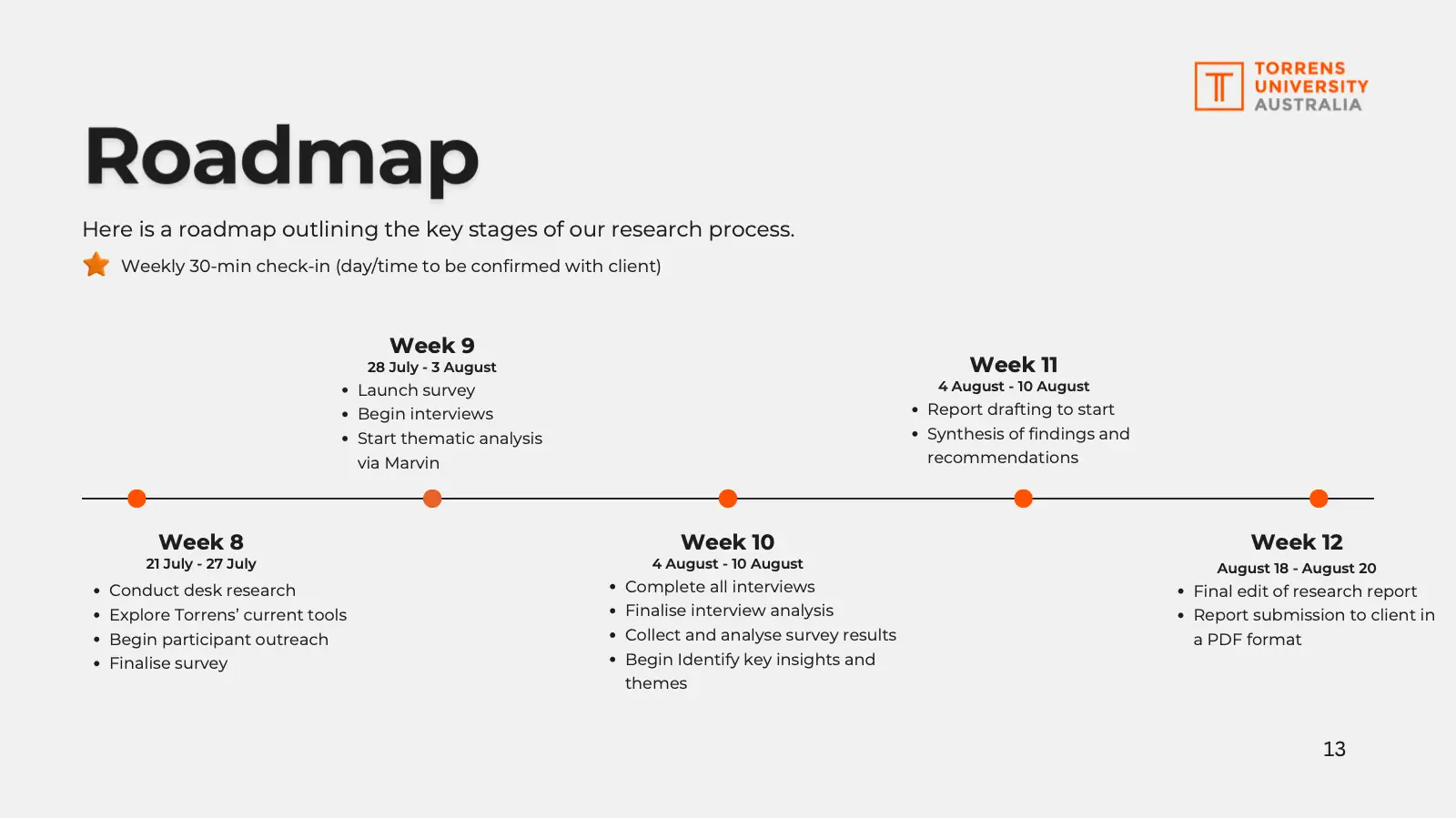
The brief asked how Torrens University could use digital to improve its online collaborative learning spaces. I set three research objectives, broke them into 13 research questions, and mapped every interview and survey question back to one. Then I ran desk research, interviewed three postgraduate students and a lecturer, and surveyed 10 students.
- To define what good online collaboration looks like, and the common pitfalls.
- 3 postgraduate students and 1 lecturer, to hear first-hand where the tools work and where they don’t.
- To check whether the interview themes held up across more students.
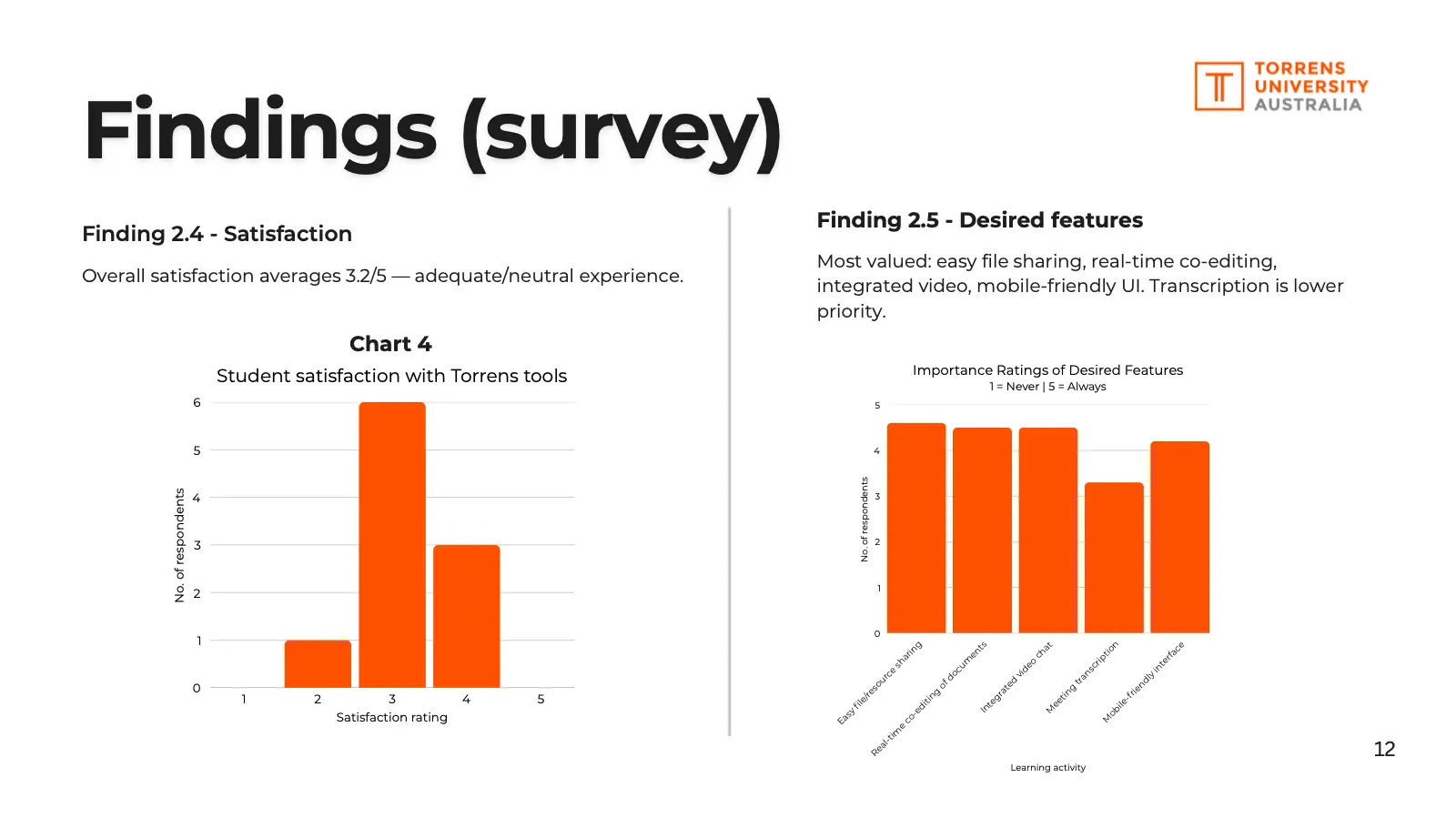
Students could get their work done, but it was spread across too many places, and they rated Torrens’ tools 3.2 out of 5 on average. Four findings and six recommendations, from clarifying what each tool is for to better hybrid rooms.
- Notifications, discussions and links lived in both Teams and MyLearn. Recommended: reduce platform fragmentation by clarifying roles; establish consistency and provide training.
- Finding shared files was a top problem in the survey. Recommended: streamline the file organisation and notification systems.
- Students used Miro, Canva, Google and WhatsApp alongside the official tools. Recommended: enhance collaborative features within the official ecosystem.
- Lecturers set up hybrid rooms themselves. Recommended: improve hybrid classroom support.
Beyond the report: I’d start with the changes that cost the least and help every student, and keep researching alongside, checking before any tools change or equipment is bought.
What I’d do first
- Clarify what each tool is for, set guidelines and training, and tidy files and notifications. Mostly staff time.
- Better collaboration features in Teams and Office 365, or an official tool like Miro.
- New cameras and microphones for hybrid rooms, once more lecturers confirm the need.
The research guide scored 82, the plan 91.75 and the final report 82.
91.75out of 100 for the research plan
Perhaps the most impressive inclusion is the question alignment.
My course coordinator, on the research plan.
Clear objectives kept every question on track. Next time I’d recruit earlier and hear from more people.
What I learned
- Every interview and survey question mapped back to a research question, so the research never drifted off track.
- They helped me prepare, and on a client project they’d get clients and stakeholders on the same page.
What I'd do differently
- I aimed for 25 survey responses and got 10.
- I lost one lecturer interview, so it couldn’t count.
- Connect each finding to Torrens’ goals, like retention and student satisfaction.
- Support staff and administrators see problems students and lecturers don’t.
The brief
My university course gave us a scenario: online collaborative learning spaces can help students engage, discuss and work on group projects, especially online or in hybrid classes, but there are so many tools out there that it can be overwhelming. The question was:
How can Torrens University use digital to improve online collaborative learning spaces so students can focus on their studies?
Part 1 of 5
How did I research it?
Defining the objectives
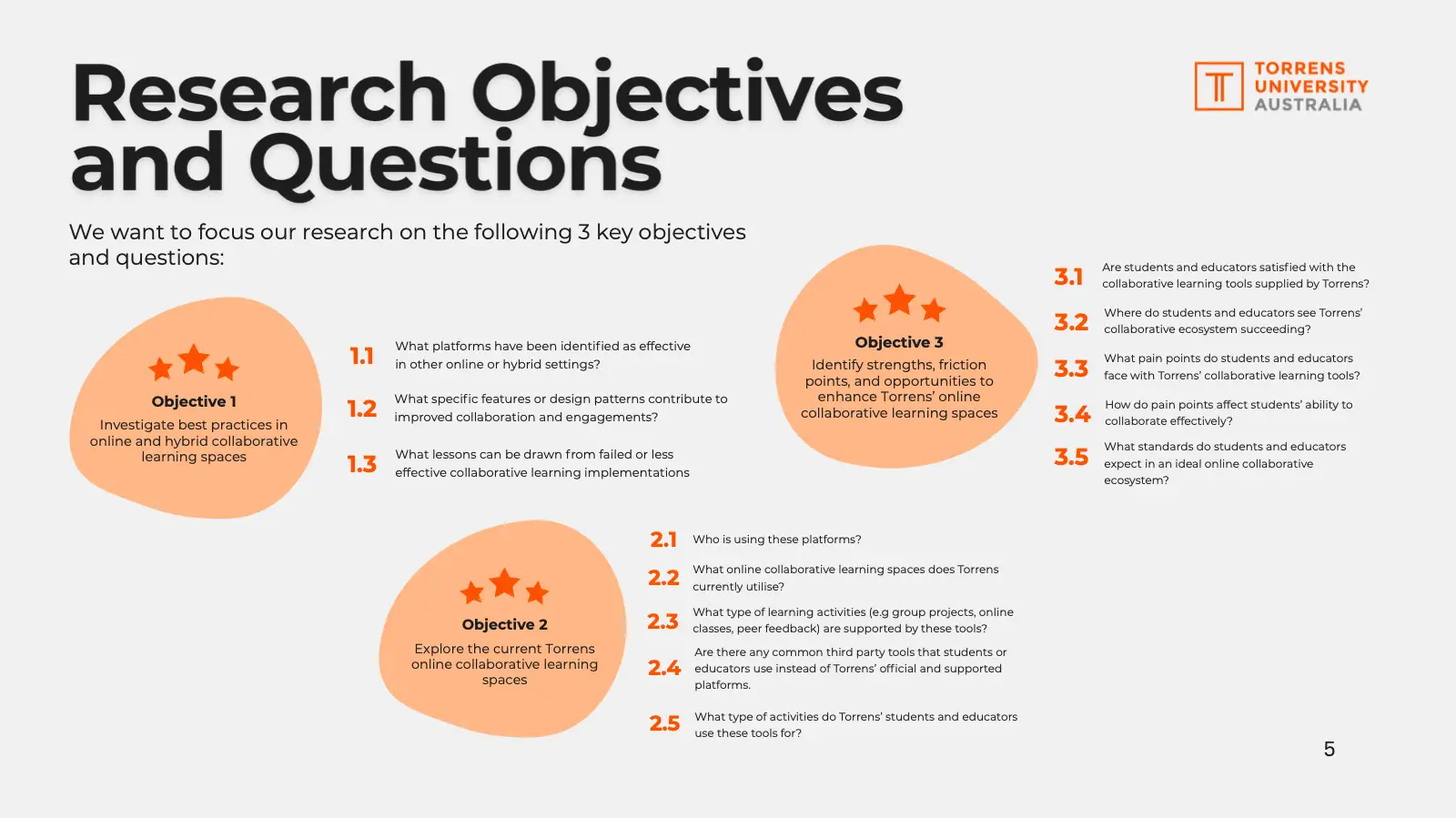
To get started, I put together a research plan with three objectives: find what good looks like elsewhere, see how Torrens’ tools are used today, and find what works and what doesn’t. Each had its own research questions.
The brief
How can Torrens University use digital to improve online collaborative learning spaces so students can focus on their studies?
Objective 1
Best practice elsewhere
Investigate best practices in online and hybrid collaborative learning spaces
- What platforms have been identified as effective in other online or hybrid settings?
- What specific features or design patterns contribute to improved collaboration and engagement?
- What lessons can be drawn from failed or less effective collaborative learning implementations?
Objective 2
How Torrens works today
Explore the current Torrens online collaborative learning spaces
- Who is using these platforms?
- What online collaborative learning spaces does Torrens currently use?
- What type of learning activities (e.g. group projects, online classes, peer feedback) are supported by these tools?
- Are there any common third-party tools that students or educators use instead of Torrens’ official platforms?
- What type of activities do Torrens’ students and educators use these tools for?
Objective 3
What works and what doesn’t
Identify strengths, friction points and opportunities to enhance Torrens’ online collaborative learning spaces
- Are students and educators satisfied with the collaborative learning tools supplied by Torrens?
- Where do students and educators see Torrens’ collaborative ecosystem succeeding?
- What pain points do students and educators face with Torrens’ collaborative learning tools?
- How do pain points affect students’ ability to collaborate effectively?
- What standards do students and educators expect in an ideal online collaborative ecosystem?
Hover or tap a question to read it in full.
Research methods
To answer those questions, I chose the following research methods:
Desk research
Academic sources and industry reports
A benchmark for what good online collaboration looks like, and the common pitfalls, to measure Torrens against.
AnsweredObjective 1
4 interviews
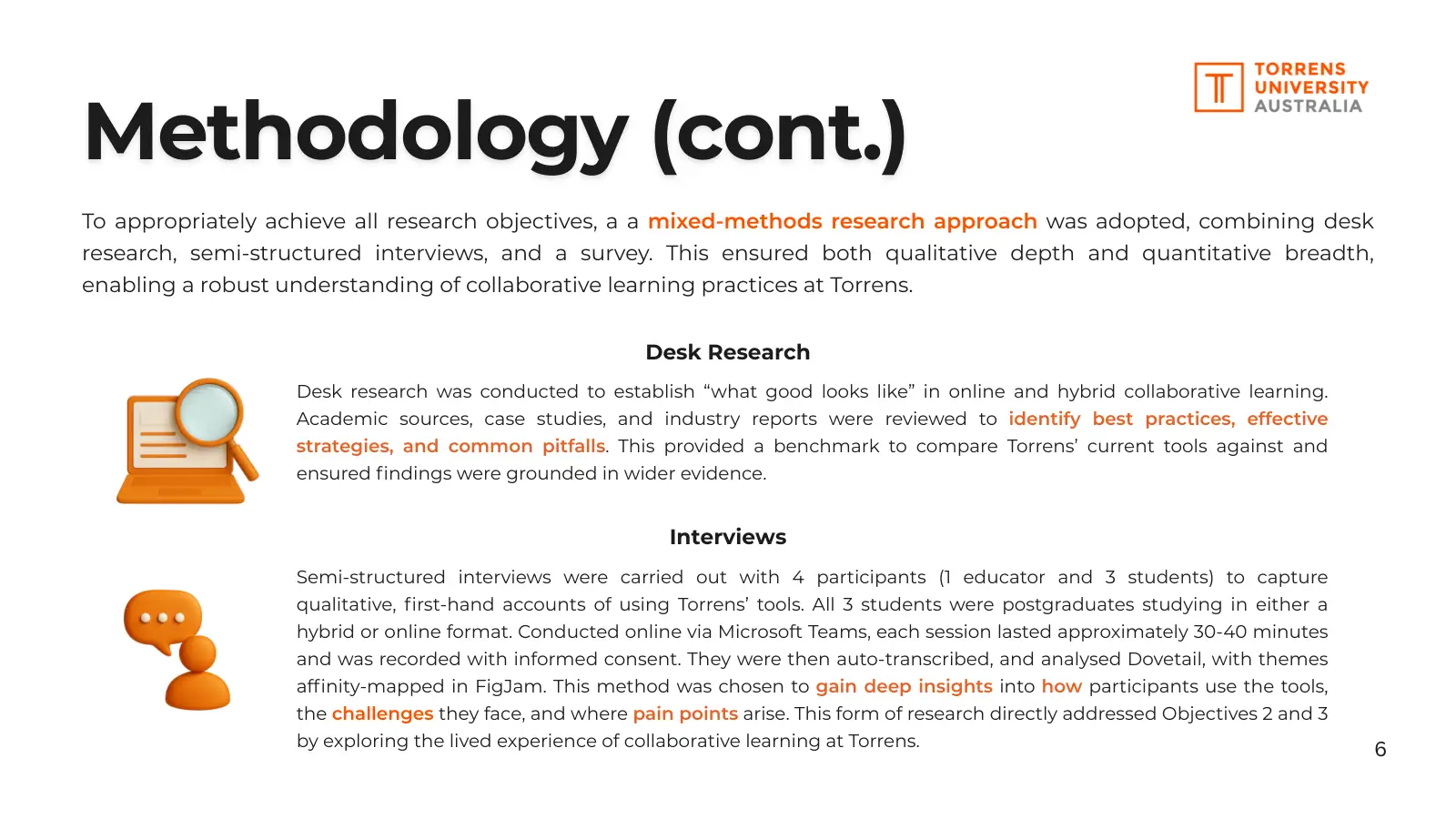
3 students and 1 lecturer, 30–40 minutes on Teams
First-hand accounts of how students and lecturers use the tools, what works, and where it breaks down.
AnsweredObjective 2Objective 3
Survey of 10 students
Google Forms
To test the interview themes with more students, and measure tool use, satisfaction and what to fix first.
AnsweredObjective 2Objective 3
Every question had a job
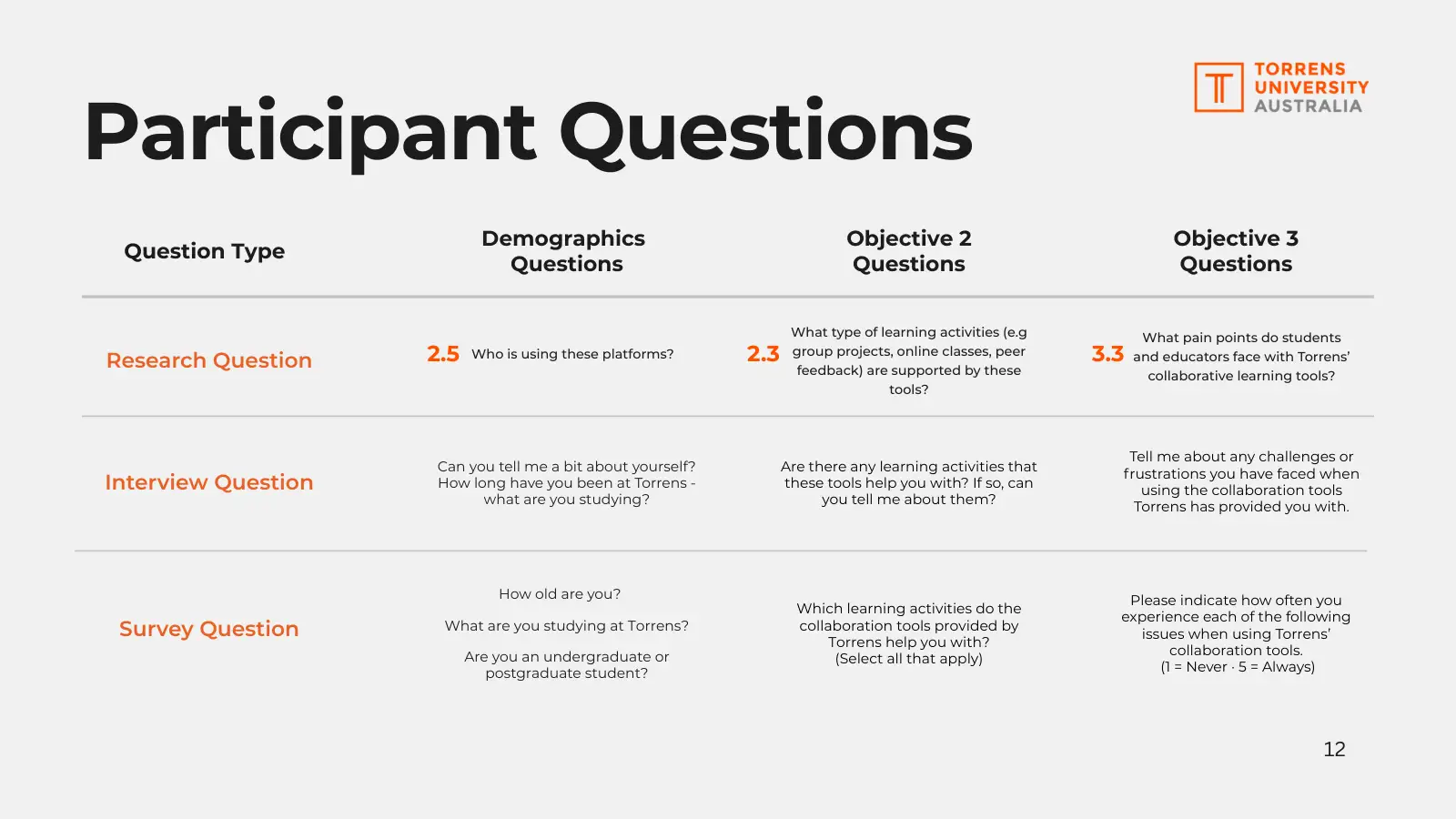
I ensured that each interview and survey question traced back to a research question, so they answered to the research objectives.
2.3 Research question
What learning activities are supported by these tools?
Asked in interviews
“Are there any learning activities that these tools help you with? If so, can you tell me about them?”
Asked in the survey
“Which learning activities do the collaboration tools provided by Torrens help you with? (Select all that apply)”
3.3 Research question
What pain points do students and educators face with Torrens’ collaborative learning tools?
Asked in interviews
“Tell me about any challenges or frustrations you have faced when using the collaboration tools Torrens has provided you with.”
Asked in the survey
“How often do you experience each of the following issues when using Torrens’ collaboration tools? (1 = Never, 5 = Always)”
Two of the question traces from my research plan
Analysing the research data
Each method had its own path to the findings, then they came together.
Desk research
- Reviewed academic sources
- Summarised into 4 benchmarks
Interviews
- Transcribed in Teams
- Tagged by theme in Dovetail
- Checked with AI
Dovetail’s AI and ChatGPT surfaced patterns I’d missed. ChatGPT had to point to the raw data for every claim, which I then checked myself.
Survey
- Exported 10 responses
- Charted the results
- 1
Group
Affinity-mapped insights from all three into themes in FigJam.
- 2
Answer
Answered each research question by combining all three methods.
Part 2 of 5
What did I find and recommend?
What I found
Torrens’ tools did the job. Students rated them 3.2 out of 5, and every problem in the survey scored below 3 out of 5 for how often it happened. The trouble was in how the tools fit together. Teams had become the place to talk and MyLearn the place to store things, but notices, discussions and even class links turned up in both. Where the official tools fell short, with shared files, whiteboards and quick group chats, students filled the gaps with tools of their own. And in hybrid classes, the lecturer I spoke to had to set up the equipment before every class, while online and on-campus students were kept in separate groups.
How satisfied students were
Satisfaction ratings from 10 students: none gave 1, one gave 2, six gave 3, three gave 4, none gave 5.
- 01Report findings 3.1, 3.2, 3.3Fragmentation between MyLearn and TeamsSee where it led
- 02Report findings 2.3, 2.5Difficulty finding shared files and resourcesSee where it led
- 03Report findings 2.6, 3.4Reliance on third-party toolsSee where it led
- 04Report finding 3.5Hybrid room setupsSee where it led
Forming recommendations
Each finding led to a recommendation. Pick one to trace it from the research question behind it, through what I heard and what the desk research said, to what I recommended.
Research questions
2.2What online collaborative learning spaces does Torrens currently use?
3.3What pain points do students and educators face with Torrens’ collaborative learning tools?
What I asked
In interviews
“What kind of online collaborative learning tools does Torrens provide you with?”
“Tell me about any challenges or frustrations you have faced when using the collaboration tools Torrens has provided you with.”
In the survey
Which of Torrens’ tools they use, and how often they get notifications they don’t need, or miss ones they do.
What I heard
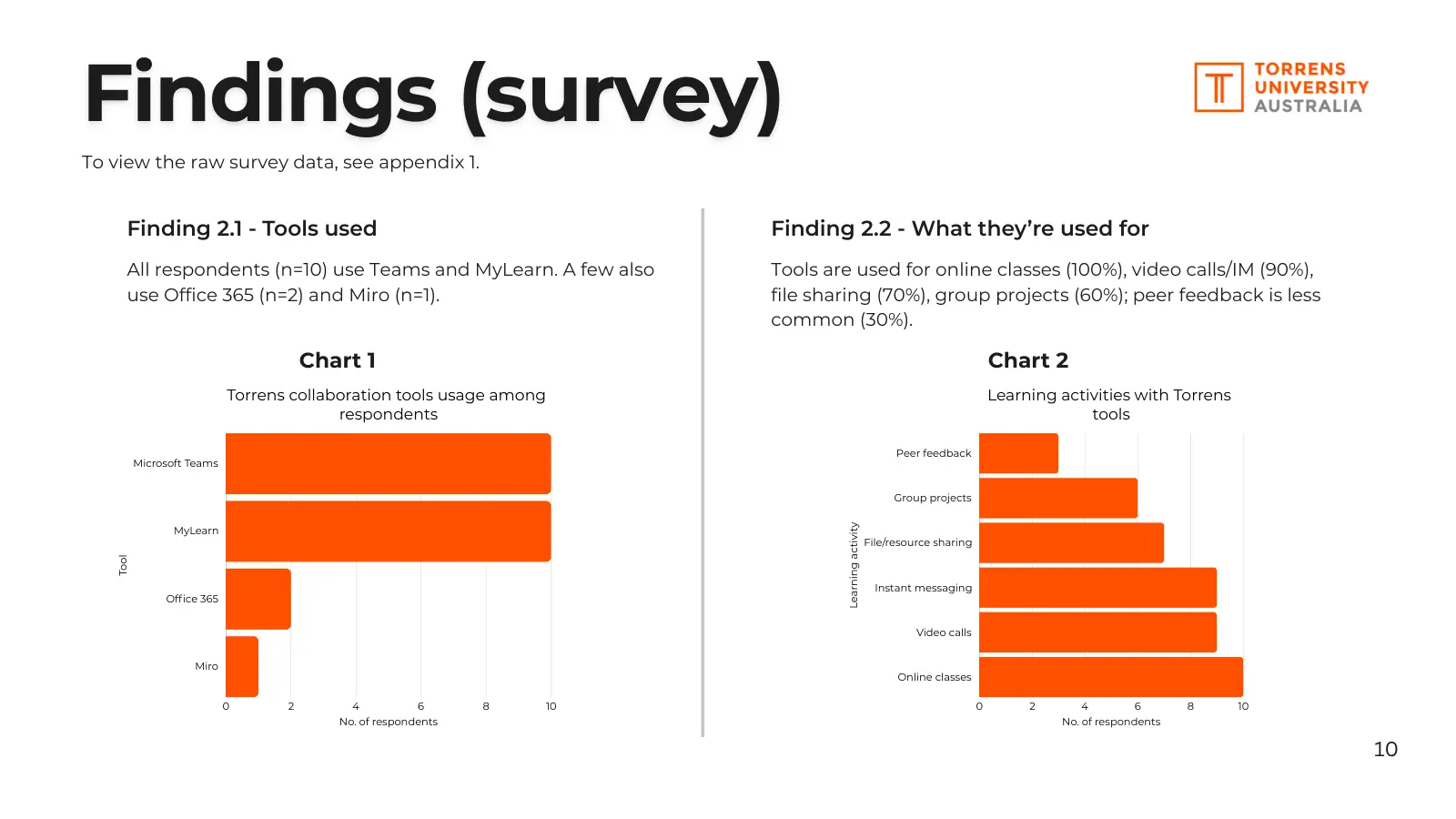
10 of 10 students use both Teams and MyLearn.
“The same thing is being posted on two different platforms. So it can make it a little bit overwhelming… If it was just posted in one place, I think it would make it easier to find. That way, people are all looking at the same place.”
Postgraduate student, studying onlineWhat the desk research said
Report finding 1.2
Real-time suites work when norms and support exist
Tools like Teams make co-editing and quick communication easy, but only with shared norms, training and reliable tech behind them.
Report finding 1.4
Forums lag behind live channels
Static forums rarely get students creating together; live channels like Teams keep discussion and peer support going.
What I found
Teams is the hub for talking and live classes; MyLearn is used to store resources and submit work. But notifications, discussions and even class links turned up in both, which confused students, and each course used the tools a little differently. One student had seen a class posted with two different links, so some students thought there was no class. Notifications seem to have since moved to Teams alone. Collaboration was mostly live in Teams, while asynchronous spaces like MyLearn discussion boards and Teams channels were under-utilised: “people don’t engage too much with it,” as one student put it.
What I recommended
Report recommendation 2
Reduce platform fragmentation by clarifying roles
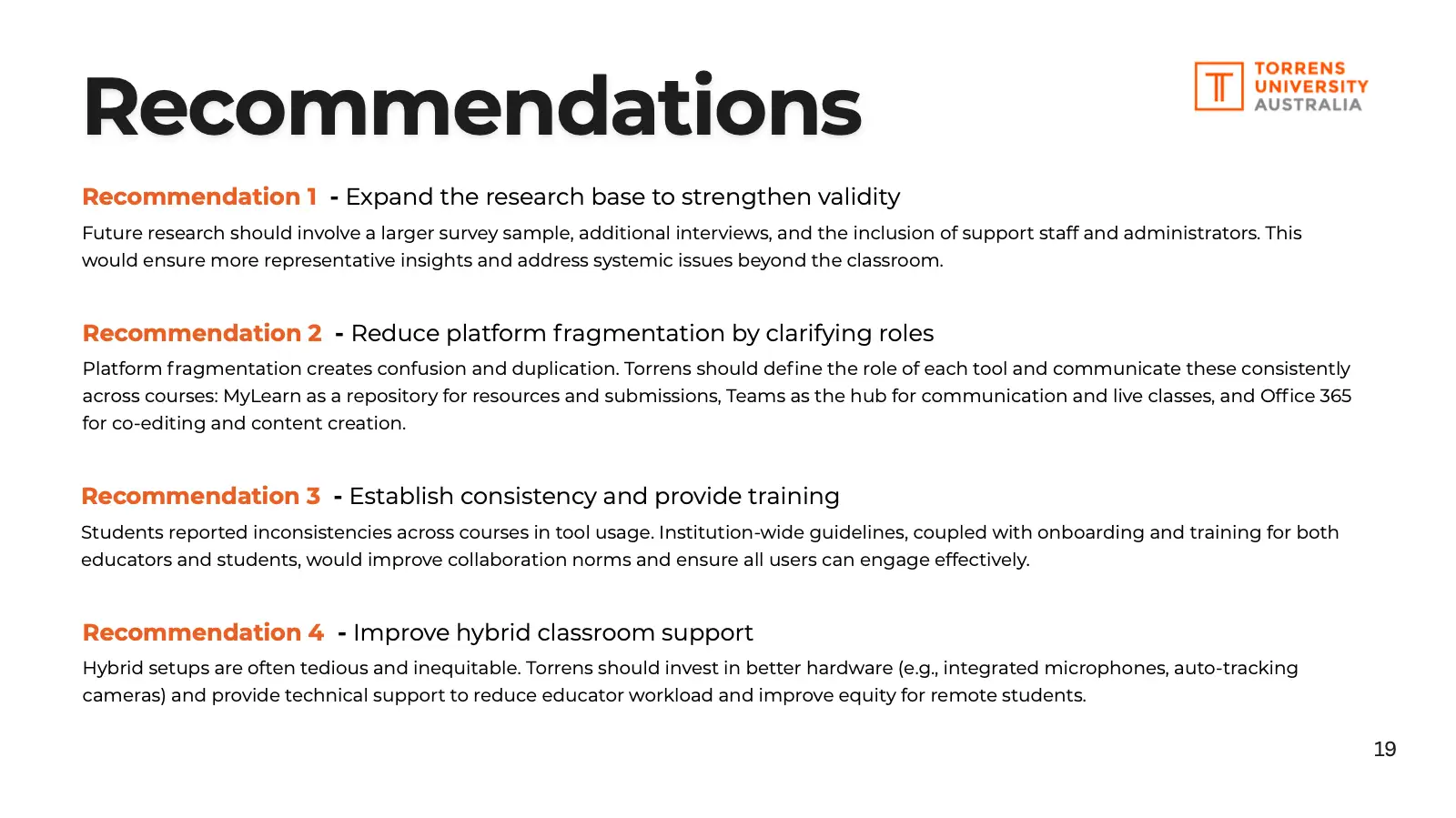
Platform fragmentation creates confusion and duplication. Torrens should define the role of each tool and communicate these consistently across courses: MyLearn as a repository for resources and submissions, Teams as the hub for communication and live classes, and Office 365 for co-editing and content creation.
Report recommendation 3
Establish consistency and provide training
Students reported inconsistencies across courses in tool usage. Institution-wide guidelines, coupled with onboarding and training for both educators and students, would improve collaboration norms and ensure all users can engage effectively.
Research questions
3.3What pain points do students and educators face with Torrens’ collaborative learning tools?
3.5What standards do students and educators expect in an ideal online collaborative ecosystem?
What I asked
In interviews
“Tell me about any challenges or frustrations you have faced when using the collaboration tools Torrens has provided you with.”
“If you could design the ideal online collaborative learning space for Torrens, what would it look like?”
In the survey
How often they have trouble finding shared files (1 = never, 5 = always), and how important features like easy file sharing are to them.
What I heard
2.7 out of 5 on average for how often students struggled to find shared files (1 = never, 5 = always).
“I would like to have easier access to the OneDrive documentation, to the Teams channels… I would like to have everything in one place.”
Postgraduate student, studying on campusWhat I found
Finding shared files was one of the three most common problems in the survey, with missed notifications and missing features. Students also rated easy file sharing above 4 out of 5 for importance. When shared folders were set up well, they worked: one student’s capstone group kept every document in OneDrive.
What I recommended
Report recommendation 6
Streamline the file organisation and notification systems
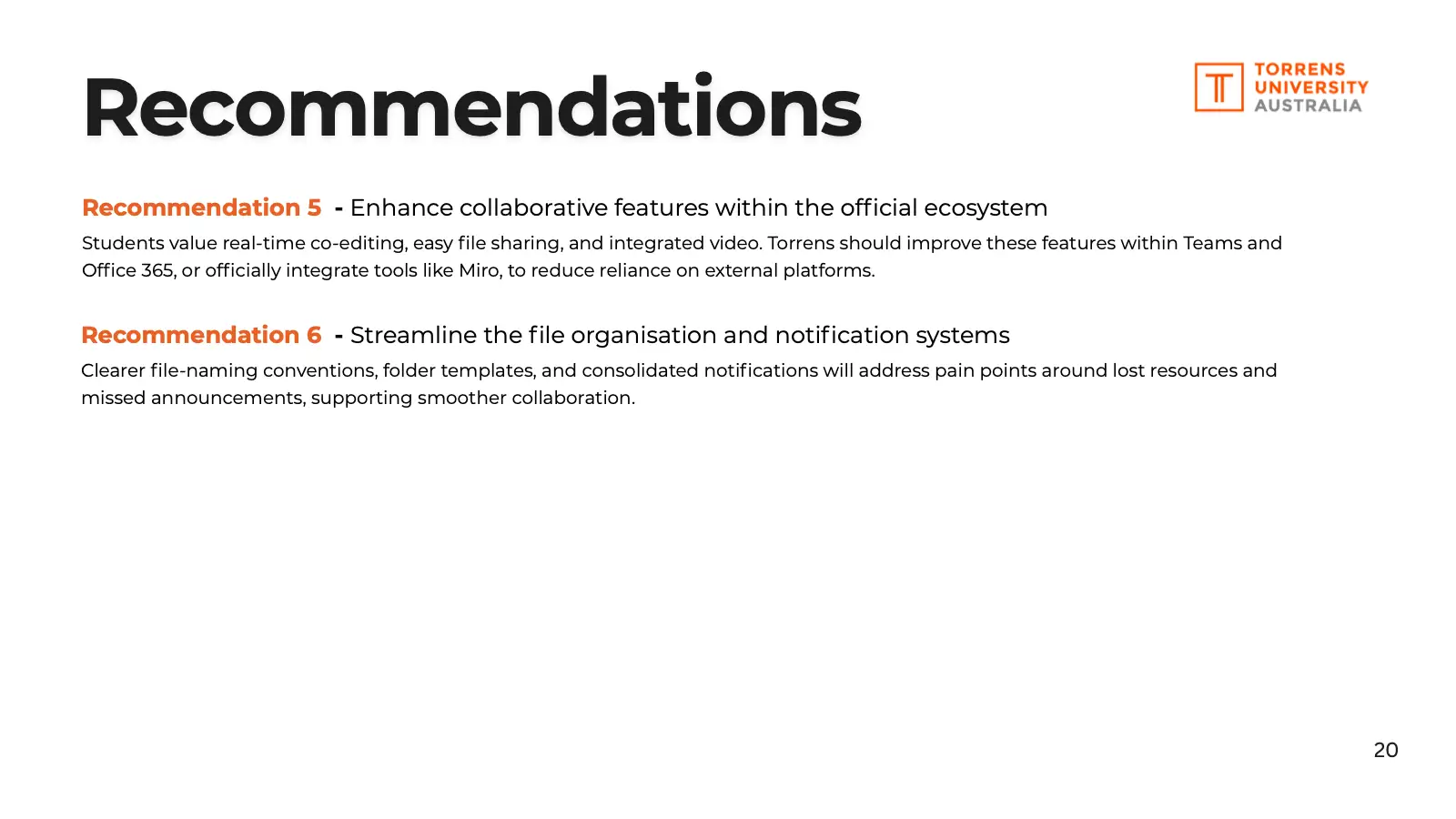
Clearer file-naming conventions, folder templates, and consolidated notifications will address pain points around lost resources and missed announcements, supporting smoother collaboration.
Research question
2.4Are there any common third-party tools that students or educators use instead of Torrens’ official platforms?
What I asked
In interviews
“Do you ever use any non-Torrens tools for collaboration? What made you choose those?”
In the survey
Which tools outside Torrens they use, and why.
What I heard
8 of 10 students also use tools Torrens doesn’t provide, most often Miro (4 of 10).
Why students use other tools
Survey: number of students (out of 10) who chose each reason. They could choose more than one. Two reasons chosen by one student each aren’t shown. “They will suggest Miro or Figma… but they won’t really teach you how to use them. You have to learn by yourself.”
Postgraduate student, studying hybridWhat the desk research said
Report finding 1.3
Whiteboards enhance ideation but risk clutter
Miro’s templates and open canvas help students create together, but without structure and accessibility, boards can tire people out or leave them behind.
Report finding 1.2
Real-time suites work when norms and support exist
Tools like Teams make co-editing and quick communication easy, but only with shared norms, training and reliable tech behind them.
What I found
Students use Miro, Canva, Google, Figma and WhatsApp alongside the official tools, mostly because Torrens’ tools lack features they need or they already know the others. Miro was the whiteboard of choice; the lecturer I spoke to found the one built into Teams less efficient. Lecturers suggest tools like Miro, but one student said no one shows them how to use them.
What I recommended
Report recommendation 5
Enhance collaborative features within the official ecosystem
Students value real-time co-editing, easy file sharing, and integrated video. Torrens should improve these features within Teams and Office 365, or officially integrate tools like Miro, to reduce reliance on external platforms.
Report recommendation 3
Establish consistency and provide training
Students reported inconsistencies across courses in tool usage. Institution-wide guidelines, coupled with onboarding and training for both educators and students, would improve collaboration norms and ensure all users can engage effectively.
Research questions
3.1Are students and educators satisfied with the collaborative learning tools supplied by Torrens?
3.4How do pain points affect students’ ability to collaborate effectively?
What I asked
In interviews
“From your experience with these collaboration tools, are you satisfied with them?”
“Thinking about your experience with collaboration tools, have they influenced how students work together?”
In the survey
Not asked: the survey went to students only. This came from the lecturer interview.
What I heard
“It can provide me an OK experience… It’s not providing me a delightful experience to teach.”
Lecturer, teaching online and hybrid classesWhat the desk research said
Report finding 1.2
Real-time suites work when norms and support exist
Live tools need reliable tech behind them, or some students end up with a worse experience than others.
What I found
Before each hybrid class, the lecturer sets up a camera, microphone and screen, and the camera doesn’t always work: twice in recent weeks it didn’t work at all. Online and on-campus students are also kept in separate Teams and MyLearn groups, partly because of student visa rules, so they can’t be mixed in groups or see each other’s discussion posts.
What I recommended
Report recommendation 4
Improve hybrid classroom support
Hybrid setups are often tedious and inequitable. Torrens should invest in better hardware (e.g. integrated microphones, auto-tracking cameras) and provide technical support to reduce educator workload and improve equity for remote students.
My takeaway
The tools weren’t the problem so much as the overlap between them. Most of the fixes are about clarity rather than new software, so Torrens could start without buying anything new.
Part 3 of 5
Where would I take it next?
The report I submitted listed the recommendations but didn’t say what to do first. Looking back, if I had to lay out a timeline, I’d order them by what each recommendation needs, starting with the changes that cost the least and reach the most students.
First
Cheapest: mostly staff time for guidelines, folders and training. Helps every student, since all 10 I surveyed use both Teams and MyLearn.
Reduce platform fragmentation by clarifying rolesReport recommendation 2
Platform fragmentation creates confusion and duplication. Torrens should define the role of each tool and communicate these consistently across courses: MyLearn as a repository for resources and submissions, Teams as the hub for communication and live classes, and Office 365 for co-editing and content creation.
Establish consistency and provide trainingReport recommendation 3
Students reported inconsistencies across courses in tool usage. Institution-wide guidelines, coupled with onboarding and training for both educators and students, would improve collaboration norms and ensure all users can engage effectively.
Streamline the file organisation and notification systemsReport recommendation 6
Clearer file-naming conventions, folder templates, and consolidated notifications will address pain points around lost resources and missed announcements, supporting smoother collaboration.
Next
Costs more: changing Teams and Office 365, or paying for a tool like Miro. Helps most students, since 8 of 10 already use other tools.
Enhance collaborative features within the official ecosystemReport recommendation 5
Students value real-time co-editing, easy file sharing, and integrated video. Torrens should improve these features within Teams and Office 365, or officially integrate tools like Miro, to reduce reliance on external platforms.
Later
Costs the most: new cameras and microphones in every hybrid room. Only helps hybrid classes, and came from one lecturer, so I’d check with more lecturers first.
Improve hybrid classroom
supportReport recommendation 4Hybrid setups are often tedious and inequitable. Torrens should invest in better hardware (e.g. integrated microphones, auto-tracking cameras) and provide technical support to reduce educator workload and improve equity for remote students.
Alongside every stepKeep researchingReport recommendation 1
A larger survey, more interviews, and support staff and administrators. Ten students and four interviews can’t show whether experiences differ by discipline or by how long someone has studied, and there were hints that they do: the two design students’ lecturers suggested Miro or Figma, while a business student’s capstone group worked from OneDrive and WhatsApp.
Before changing any toolsCheck which tools each discipline actually needs, so Torrens doesn’t pay for the wrong ones.
Before buying hybrid equipmentCheck with more lecturers what hybrid rooms need.
Part 4 of 5
What was the outcome?
The marks
Assessment 1
Research guide
82/100
“A highly effective framework for your project.”
To improve
“With a little more refinement in developing probing interview questions, your research has the potential to uncover deep insights.”
Assessment 2Highest mark
Research plan
91.75/100
“Perhaps the most impressive inclusion is the question alignment.”
See the question alignment in Part 1Assessment 3
Research report
82/100
“Your recommendations are relevant and actionable.”
To improve
“Focus on more deeply connecting your findings to the broader business goals.”
“Consider adding more specific, practical details to your recommendations.”
Read the full documents
The research plan and the final report as I submitted them, minus the appendix links to the raw survey data and interview transcripts.
Part 5 of 5
What did I learn?
What I learned
Trace every question
This was one of the most valuable skills I gained working on this project. Because I had clear objectives, and ensured every interview and survey question mapped back to a research question, my research never drifted off track. I was always answering the questions the brief needed answered. In the future, I will use this technique to keep my research on track.
Write a research guide and plan first
Putting these together helped me organise and prepare for the research I was going to conduct. On a client project, this would be immensely useful to show clients and stakeholders what I plan to research and why, so we’re on the same page before it starts. If the research needs their approval, it’s a clear way to show them exactly what they’re approving.
What I’d do differently
Recruit earlier
I planned for 25 survey responses and got 10. Starting sooner, and asking lecturers to share the survey, would have given a broader picture.
Back up every recording
I interviewed two lecturers but lost one recording, so only one interview could count.
Tie it to the business
Connect each finding to what Torrens cares about, like retention and student satisfaction.
Hear from staff too
Support staff and administrators see problems students and lecturers don’t.
Looking back
This project was a great opportunity to dive deep into research. Our course coordinator encouraged us to experiment with AI tools like Dovetail and ChatGPT along the way, which I really appreciated.
No designs came out of it, but it sharpened my research skills and taught me to base every recommendation on real evidence. Working through the research process from start to finish gave me a foundation I now bring to design thinking. To see research carried all the way through to a tested redesign, have a look at Daily Readings.